Mitsubishi Mini Split Remote Symbols and Indicator Lights
Two things to know before you go looking for an icon chart. First, Mitsubishi does not publish one. The M-series operation manuals describe the remote's functions — i-see, ECONO COOL, POWERFUL, NATURAL FLOW, SMART SET, the timers — in prose and by button, not as a legend of symbols with names beside them. Anything presenting itself as "the complete Mitsubishi icon table" is somebody's reconstruction. Second, the symbol that actually tells you something is not on the remote at all: it is the operation lamp on the indoor unit, and a blinking lamp means one of two very different things depending on how far the room is from your set temperature. This page covers what Mitsubishi documents, series by series, and says plainly where the documentation stops.
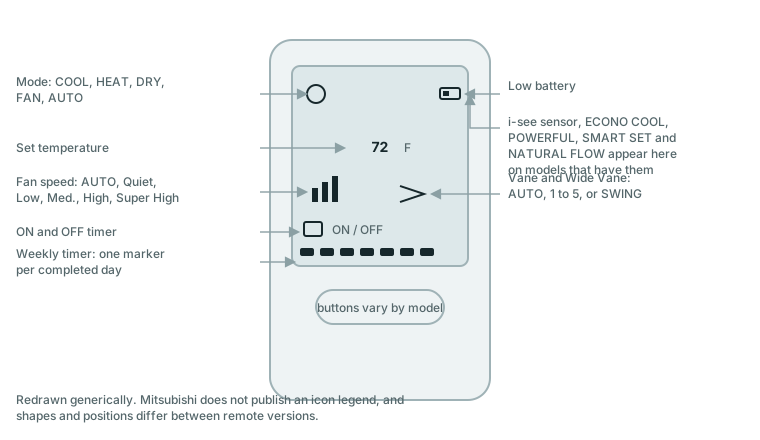
Which Mitsubishi remote do you have?
Current US M-series wall-mounted units are the MSZ-GS (Premier) and MSZ-FS (Deluxe); the MSZ-FH and MSZ-GL are earlier generations still widely installed and still supported in Mitsubishi's technical library. Which one you have decides more than you would expect — the fault blink codes are genuinely different between the FS/FH generation and the GL generation, so a chart from the wrong manual will give you the wrong answer.
Mitsubishi's own service manuals are reticent about naming the handheld remote. The FS and FH service manuals call it only "Wireless remote controller." Only the GL service manual (OBH732D) identifies specific controllers — KM15* for U1 models and KH21* for U2 models — and that identification should not be generalized to other series.
Two wired or networked controls are separate products with their own documentation: the MHK2 RedLINK wireless remote controller kit, and the kumo cloud Wi-Fi interface (PAC-USWHS002-WF-2). If your wall control is a thermostat rather than a handheld remote, you are on one of those and the symbol set is different again.
What the symbols on the remote mean
| Function shown on the display | What Mitsubishi documents it as |
|---|---|
| i-see sensor | Lights when i-see control is active; the unit detects occupants and adjusts temperature automatically |
| INDIRECT / DIRECT | i-see airflow sub-modes; toggling off cancels them |
| ABSENCE DETECTION | "automatically changes the operation to energy-saving operation when nobody is in the room" |
| ECONO COOL | Swing operation in COOL mode; the FH manual says "the set temperature and the airflow direction are automatically changed by the microprocessor" and does not publish the size of the change |
| POWERFUL | An exclusive fan speed for rapid conditioning; the FH manual describes automatic fan and temperature adjustment for 15 minutes |
| NATURAL FLOW | Airflow patterned to imitate a natural breeze |
| SMART SET | Stores and recalls a preferred combination of temperature, fan speed and airflow |
| WEEKLY TIMER | A day marker lights for each day whose timer setting is complete; the FH manual documents up to 28 ON/OFF events per week |
| ON / OFF timer | Scheduled start and stop |
| Fan speed | AUTO, Quiet, Low, Med., High, Super High |
| Vane / Wide Vane | AUTO, positions 1–5, or SWING |
| Battery indicator | "lights up when the battery is running low" |
Every row above comes from the MSZ-FS operation manual (JG79Y766H01) or the MSZ-FH operation manual (JG79A806H05). Features vary between series and trims — the GS does not carry the same feature set as the FS — so check your own manual before assuming a button exists.
What the light on the indoor unit means
This is the indicator that matters, and Mitsubishi documents it identically across the GS, FS, FH and GL manuals. It has three states, and the blinking one is where nearly all the confusion lives.
| Operation lamp | Meaning | Room temperature versus set point |
|---|---|---|
| Lit | Running to reach the set temperature | About 4 °F (2 °C) or more away |
| Blinking | Approaching the set temperature | About 2–4 °F (1–2 °C) away |
| Off | Standby (multi-system installations only) | — |
So a blinking lamp during ordinary operation, with the room close to your set point, is the unit telling you it is nearly there. That is the normal case and it is the one people misread as a fault.
When is a blinking light a fault?
When it does not fit the normal case above — and Mitsubishi's manuals set the boundary themselves rather than leaving it to interpretation. The MSZ-GS manual instructs owners to stop using the air conditioner and consult their dealer "When the left/upper operation indicator lamp blinks. (For Multi system, except for when the lamp of a multi unit blinks while the unit is on standby.)" The MSZ-GL manual lists the same instruction beside water leaking or dripping, a breaker tripping frequently, abnormal noise, and refrigerant leakage.
In practice: if the room is within a couple of degrees of your set point and everything else is normal, the blink is normal. If the unit has stopped working, is making noise, is leaking, or the blink persists with the room nowhere near the set point, treat it as a fault and read the blink count.
Blink codes differ by series — use the right table
This is the single fact most pages on this subject get wrong, and getting it wrong sends you after the wrong component. The FS and FH generations share one scheme; the GL generation uses a different one entirely, in which the same blink count means something else.
MSZ-FS and MSZ-FH (service manuals OBH872A and OBH683 Rev. E) — blinks separated by a 2.5 second pause:
| Blinks | Abnormality |
|---|---|
| 1 | Room temperature thermistor |
| 2 | Indoor coil thermistor |
| 3 | Serial signal |
| 11 | Indoor fan motor |
| 12 | Indoor control system |
MSZ-GL (service manual OBH732D) — a different scheme:
| Blinks | Abnormality |
|---|---|
| 1 | Miswiring or serial signal — no signal from the outdoor unit for 6 minutes |
| 2 | Indoor coil or room temperature thermistor |
| 3 | Indoor fan motor — no rotational frequency feedback signal during fan operation |
| 4 | Indoor control system — nonvolatile memory unreadable |
| 5 | Outdoor power system — compressor overcurrent or start failure, 3 times in 1 minute |
| 6 | Outdoor thermistors |
| 7 | Outdoor control system |
| 14 | Other abnormality |
Compare row 3 in each table. On an FS or FH, three blinks is a serial signal problem; on a GL, three blinks is the indoor fan motor. There is no universal Mitsubishi blink chart, and a page offering one is guessing on your behalf.
Reading a stored fault (Failure Mode Recall)
Mitsubishi's service manuals describe recalling a stored fault using the handheld remote, with the code then read off the indoor unit's lamp — the remote itself does not display a fault code. The MSZ-GL and MSZ-FS procedure is to hold the operation-select and TEMP buttons together, press RESET, release RESET first while continuing to hold the others for about three seconds until indicators appear on the LCD, then press OFF/ON aimed at the indoor unit.
This is a service procedure printed in a service manual, not in the owner's booklet. It is safe to perform — nothing is opened and nothing is disconnected — but the result is a blink count that needs the right table above, and the underlying faults it reports (thermistors, fan motor, control board, outdoor power system) are all dealer work.
What Mitsubishi does not document
Under this site's sourcing rule, absent means absent — so here is what we could not find in any Mitsubishi manual, despite these items appearing on other sites' symbol charts:
- A consolidated icon legend. No M-series manual we examined prints a table of every symbol with its name.
- A transmission indicator. Not documented in any manual we retrieved.
- A filter or clean indicator on the handheld remote. Could not confirm one exists for M-series wireless remotes.
- A key-lock icon. Not confirmed in M-series wireless remote documentation.
- A separate night or quiet mode icon. "Quiet" appears in the documentation as a fan speed setting, not as a distinct night-mode symbol.
- Whether the MHK2 or kumo cloud display the same fault codes as the indoor unit lamp.
If your remote shows something not covered above, the honest answer is your own model's operation manual, which Mitsubishi publishes free.
Repair or replace?
The remote itself is the cheap part of this system and the batteries are cheaper still — a low-battery indicator, or a remote whose signal has become unreliable at range, is a battery change before it is anything else. Replacement handsets are available through Mitsubishi dealers, and matching the right controller to the right indoor unit matters more than price; the GL service manual's KM15*/KH21* distinction exists because they are not interchangeable across model revisions.
Anything the blink codes point at — thermistors, the indoor fan motor, the control board, the outdoor power system — is dealer work on a sealed refrigerant system, and on equipment this expensive it is also usually warranty work. Get the blink count, get the model number off the indoor unit's label, and give both to the dealer before anyone opens anything.
When to call your dealer
- The operation lamp blinks while the room is nowhere near the set temperature, or blinks with the unit stopped.
- Water dripping from the indoor unit, or any smell of refrigerant.
- The breaker trips repeatedly, or the unit makes an abnormal noise.
- A blink count that maps to the outdoor power system, control board or fan motor on the correct table for your series.
- Any work inside the indoor or outdoor unit — these are sealed refrigerant systems and are not homeowner-serviceable.
Parts and supplies mentioned on this page
A low-battery symbol is the one problem on this page you can solve for two dollars; a wall bracket stops the remote disappearing into a sofa, which is the other one.
- AAA alkaline batteriesCheck price on Amazon
- Universal mini split remote holder / wall bracketCheck price on Amazon
Related pages
Fujitsu encodes its faults differently again — as lamp blink counts split across two lamps — and publishes its code tables only in model-specific service documents: Fujitsu mini split error codes.
Sizing an AC for the room?Air Conditioner BTU Calculator The ENERGY STAR sizing table with its sun, people, and kitchen adjustments.